
List Owl: Grocery & Shopping List
Shopping list, meal planner & recipes
List Owl watches over your pantry so you don't have to. Speak, scan or type to add items, get reminded before you run out, and keep the whole family on one list.
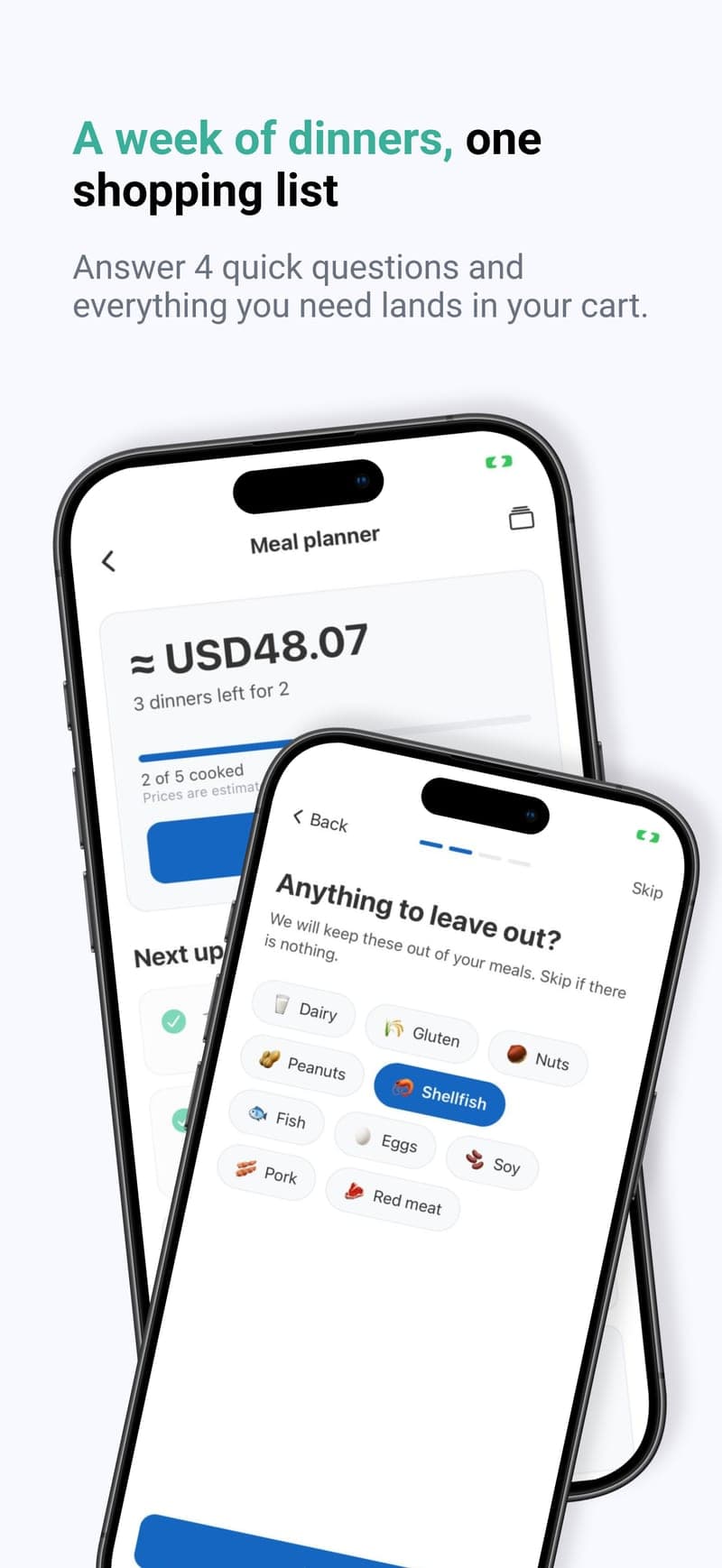
🍽️ MEAL PLANNERv1.2.3·A week of dinners, one shopping listPlan a week of dinners, turn any recipe into a list, and shop aisle by aisle. Free on iPhone and Android in 4 languages.
Free to download · No ads · Try Premium free for 3 days
✨ What's New in v1.2.3
Alerts when someone's at the store, a lighter glass design, and badges that finally count everything you do.
Know When Your Family Is Shopping
When someone starts ticking off the family list, everyone else gets a heads-up — so you can add what you need before they reach the till. New items arrive as one tidy alert, not one per item, and either can be switched off.
A Fresh Glass Look
Messages, menus and your totals now float over the list with a soft, frosted finish — Apple's Liquid Glass on iOS 26. A slimmer header leaves more room for your groceries, and you can switch the effects off in Themes.
Badges Worth Earning
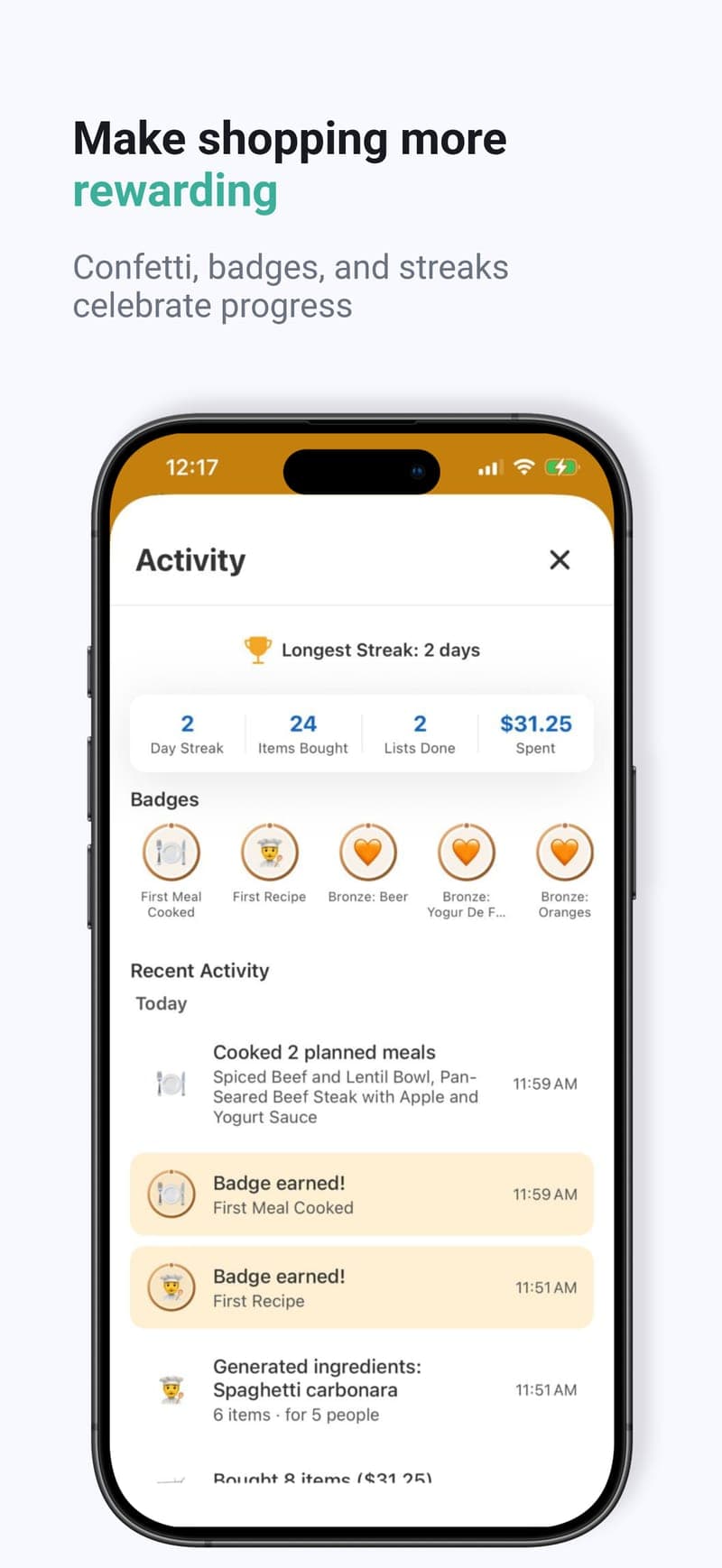
38 badges, now including meal plans, meals cooked, recipes viewed and barcode scans. Locked badges show a progress ring and how to earn them, and a toast pops the moment you earn one.
Dinner, sorted for the week
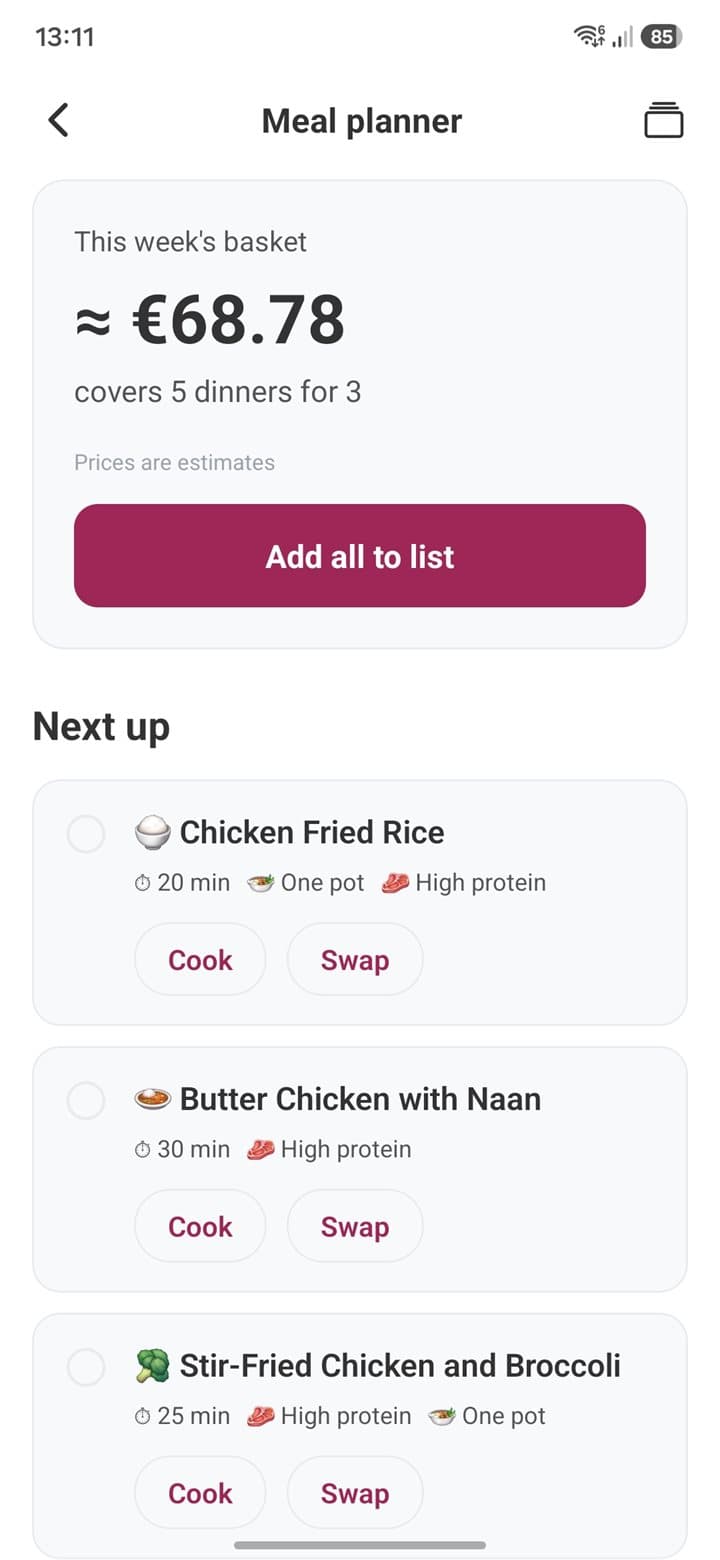
Answer four quick questions and List Owl plans a week of dinners — then writes one shopping list for all of them.
- 1👪 Who you're cooking for
- 2🚫 Anything to leave out
- 3⏱️ Your weeknight time
- 4🌮 What you like to eat
- One basket, sorted by aisle, with an estimated total
- Planned around what you usually buy
- Swap any dish for one of three alternatives
- Step-by-step Cook mode for every dinner
Included with Premium: 8 plans a month. Cancel anytime.
All Features
Everything you need to plan, shop and share — most of it free.
🍳 Meal Planning & Recipes
From “what’s for dinner?” to a full shopping list.
Meal Planner
Answer four quick questions and get a week of dinners with one merged, aisle-sorted shopping list and an estimated total. Swap dishes, cook step by step, and find every plan on every device. 8 plans a month.
Recipe to Shopping List
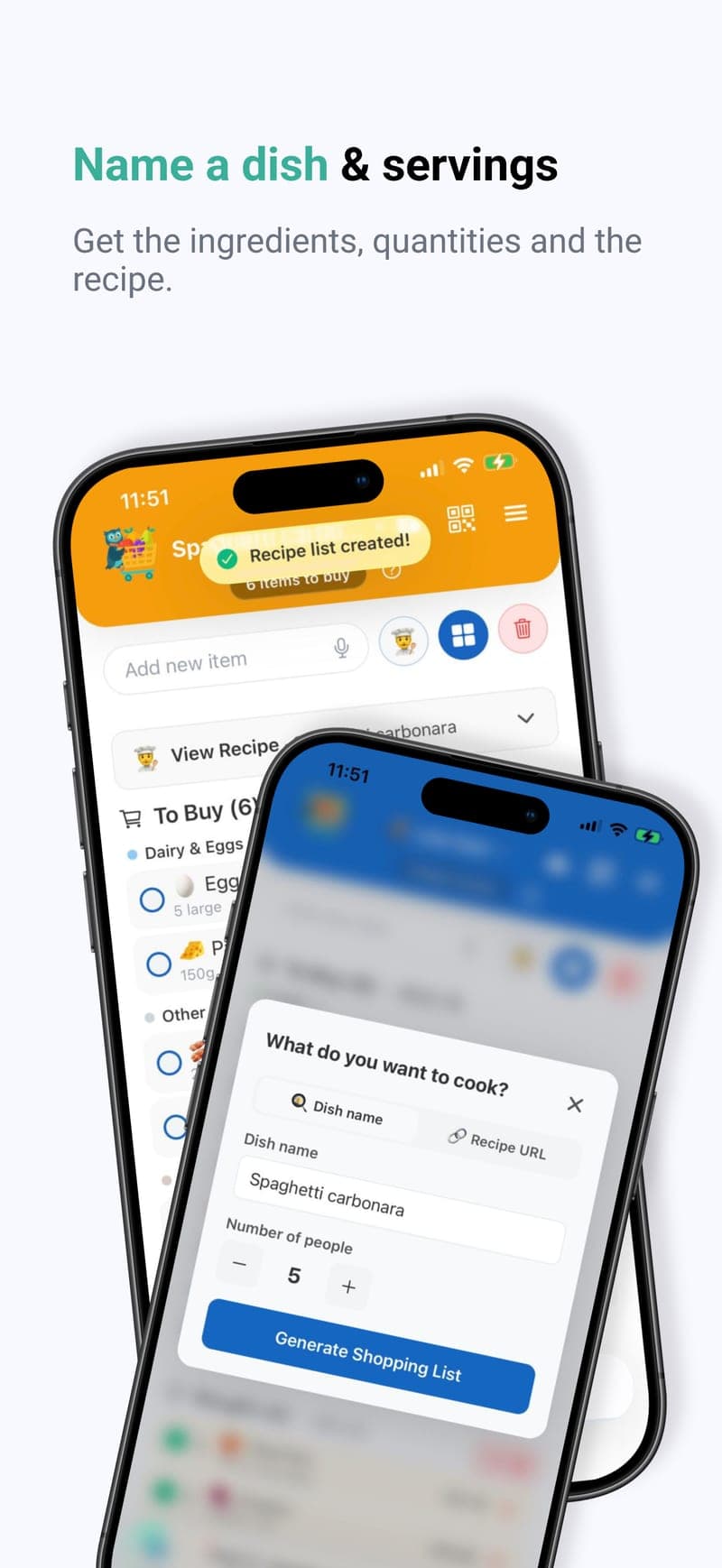
Name any dish, set the number of servings, and get a complete ingredient list generated by AI. Works in English, Spanish, Russian, and Chinese.
Recipe Import
Paste any recipe URL or share a link straight into the app to pull in the ingredients, sorted by aisle with units in your language. 5 free imports; Premium gets 30 per month.
Cooking Instructions
Every generated recipe includes an expandable card with prep time, cook time, difficulty level, and detailed step-by-step cooking instructions.
AI-Estimated Ingredient Prices
Recipe ingredients now include estimated prices based on your region. See per-person cost alongside the total, and tap any price to adjust it.
Recipe Badges
Earn Bronze, Silver, Gold, and Platinum badges as you generate more recipes. Track your culinary milestones in your achievements!
⚡ Add Items in Seconds
Speak, scan, type or browse — whatever is quickest.
Voice Input
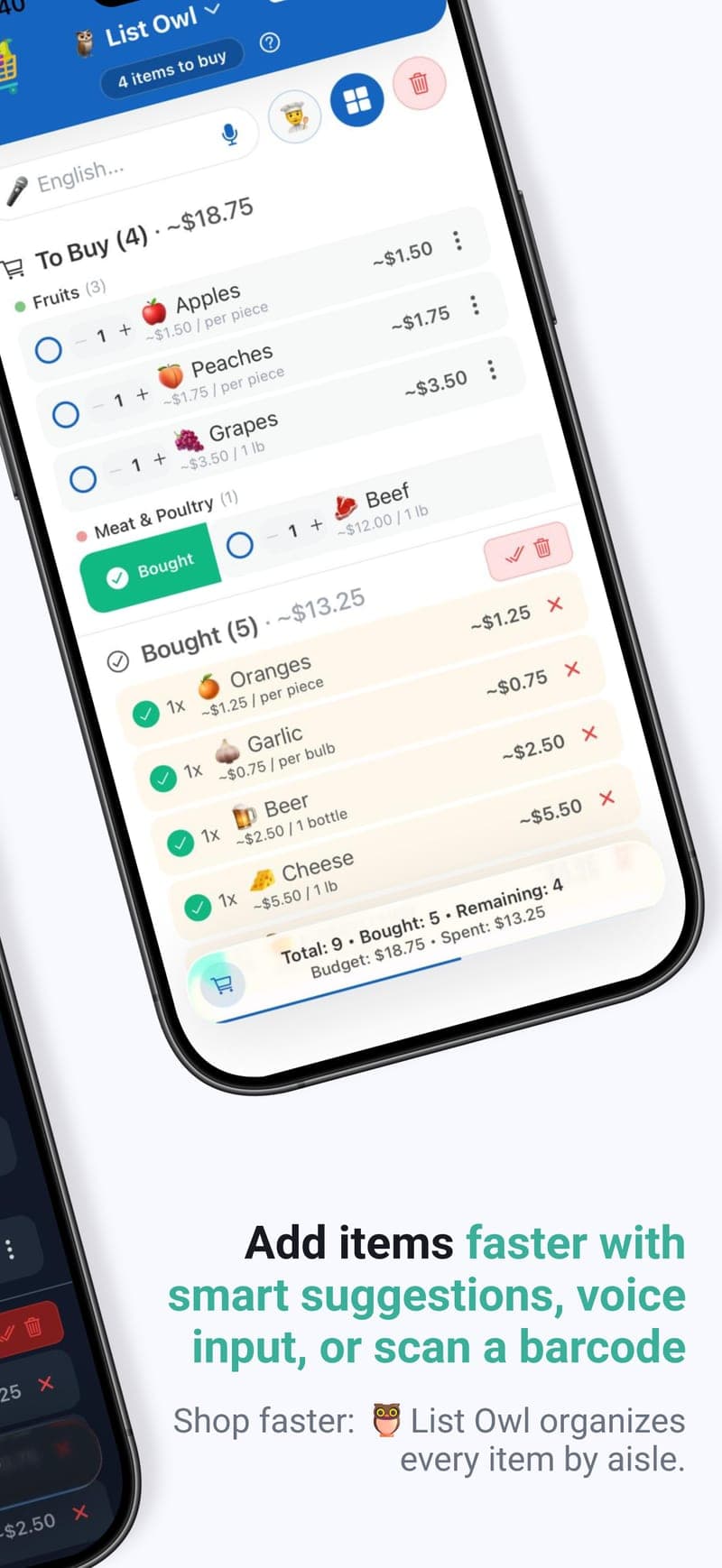
Tap the microphone in the add-item field and say what you need. Supports all 4 app languages with on-device recognition and a cloud fallback.
Barcode Scanner
Scan any product barcode to add it instantly with the correct name and emoji. Sign-in required; 5 free scans, and 150 scans per month with Premium.
Smart Suggestions
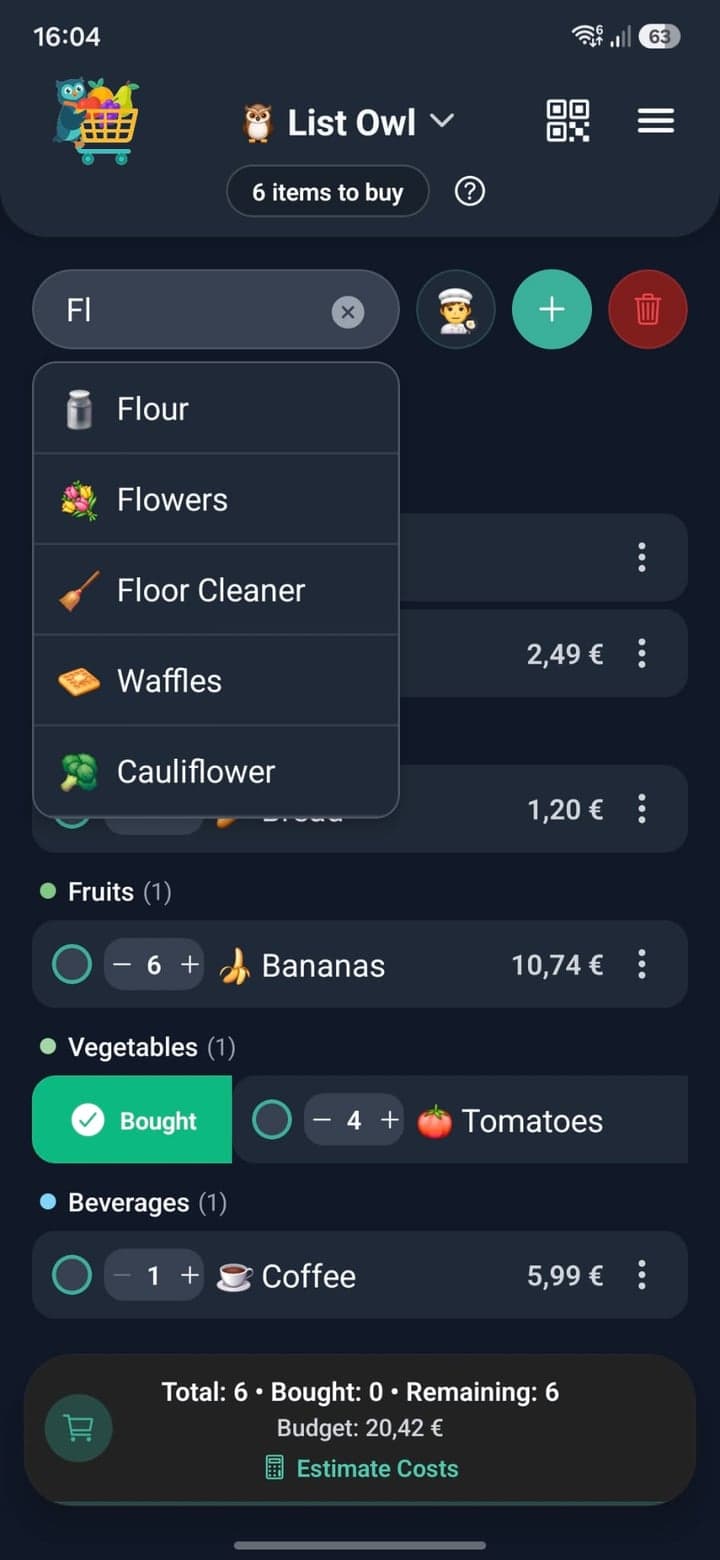
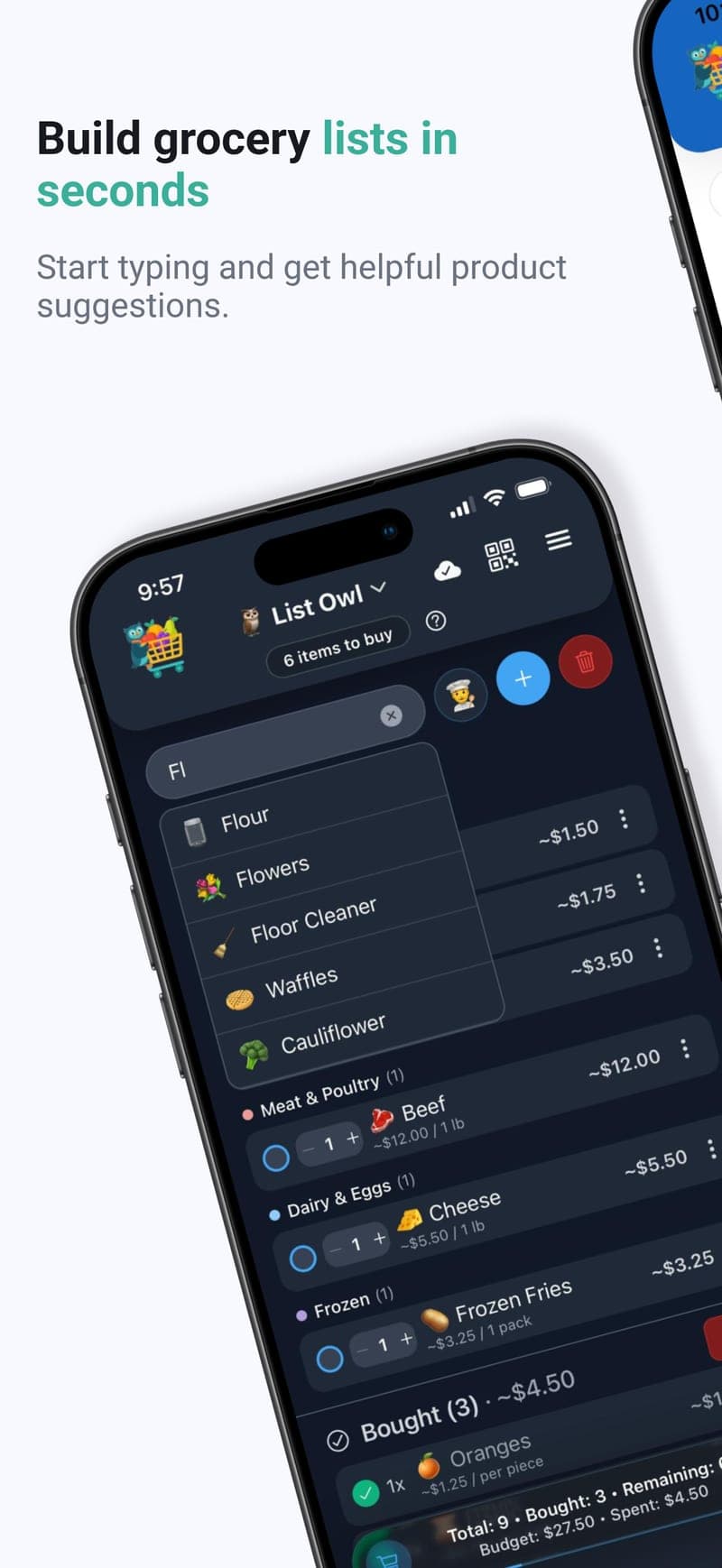
The owl knows what you need — get emoji-enhanced suggestions from 300+ products as you type, in all 4 languages.
Product Catalogue Browser
Browse our full product catalogue organized by aisle. Check multiple items across Vegetables, Dairy, Meat, Fruits, and more, then add them all at once.
App Icon Quick Actions
Long-press the app icon for instant shortcuts to add an item or choose a list -- no need to open the app first.
Custom Products Library
Save your unique items permanently for easy access in suggestions.
Localized Products
Product suggestions match your language. See Tortillas in Spanish, Pelmeni in Russian!
Quantity Management
Easily adjust item quantities with intuitive +/- controls.
🛒 Shop Faster In-Store
Aisle-sorted lists and reminders that think ahead.
21 Store Aisles
Items group themselves by store aisle with color-coded headers — now 21 aisles, including spices, grains and baking — so imported recipe ingredients land in the right place.
Smart Restock Reminders
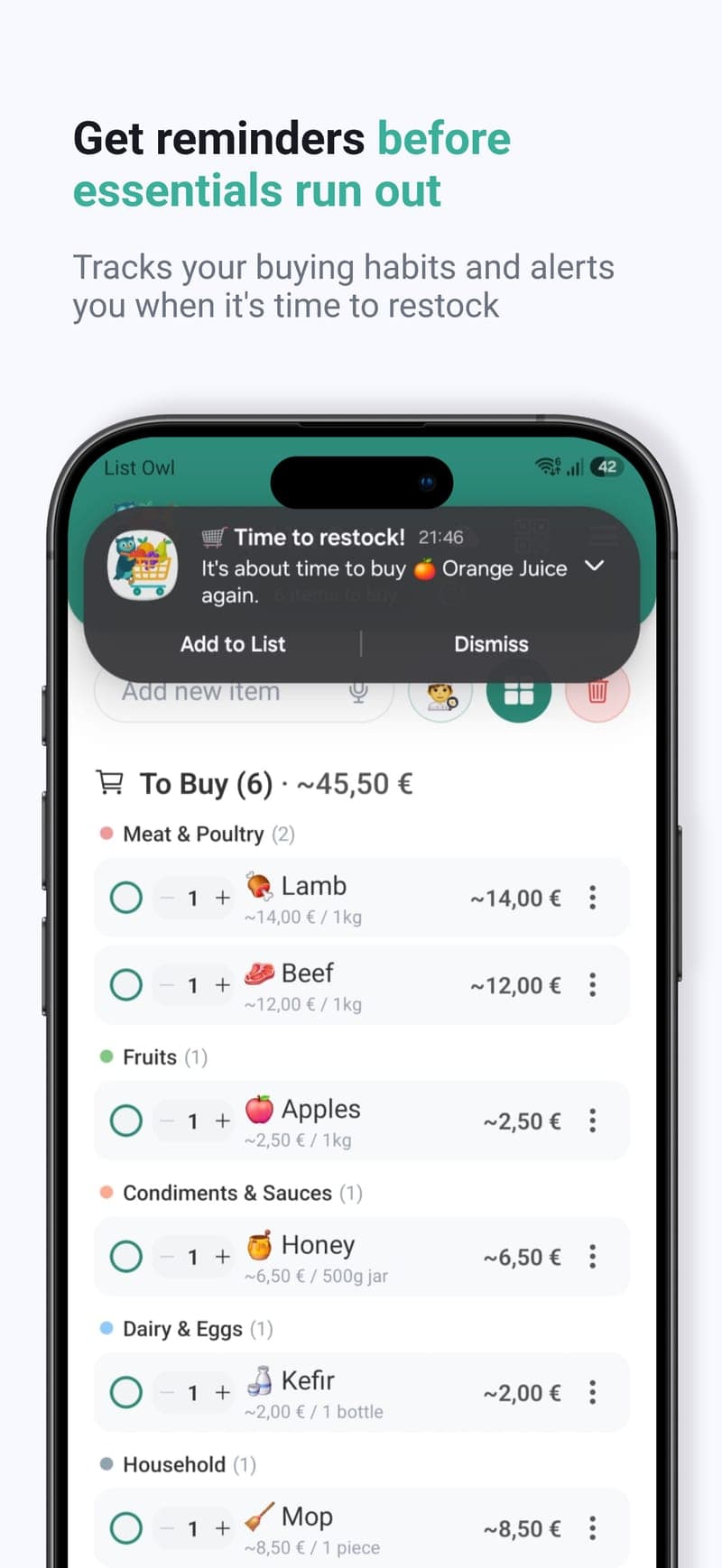
The owl watches your buying patterns and nudges you before you run out. Tap the notification to instantly add items — no app opening needed.
Customizable Reminders
Set your preferred daily reminder time. Not just 6 PM anymore!
Works Offline
Keep using your lists without a connection. The cloud icon shows when you're offline, and your changes sync automatically when you're back.
Badge Count
See unbought items on your app icon. Silent notifications, real-time updates, syncs with family list!
List Completion Celebration
Complete all items on your list and enjoy a confetti animation with haptic feedback to celebrate your accomplishment.
Haptic Feedback
Tactile feedback for adding items, marking as bought, and deletions.
👨👩👧👦 Share With Family
One list for the whole household, synced in real time.
Family Sharing
Real-time sync with up to 5 family members, with alerts when someone starts shopping. See who added what, no more duplicates — only the owner needs Premium.
Family Notifications
Get a heads-up when someone starts shopping from the family list, and one tidy summary when members add items. Tap it to jump straight to the list, or switch either alert off in Reminder settings. Members get them without Premium.
Family List Offline
Tick, add, delete and clear without a signal — changes queue on your phone and sync the moment you are back. Simultaneous edits are detected instead of quietly overwriting each other.
Cloud Backup & Sync
The owl keeps your lists safe in the cloud. Switch devices seamlessly, never lose data.
QR Code Sharing
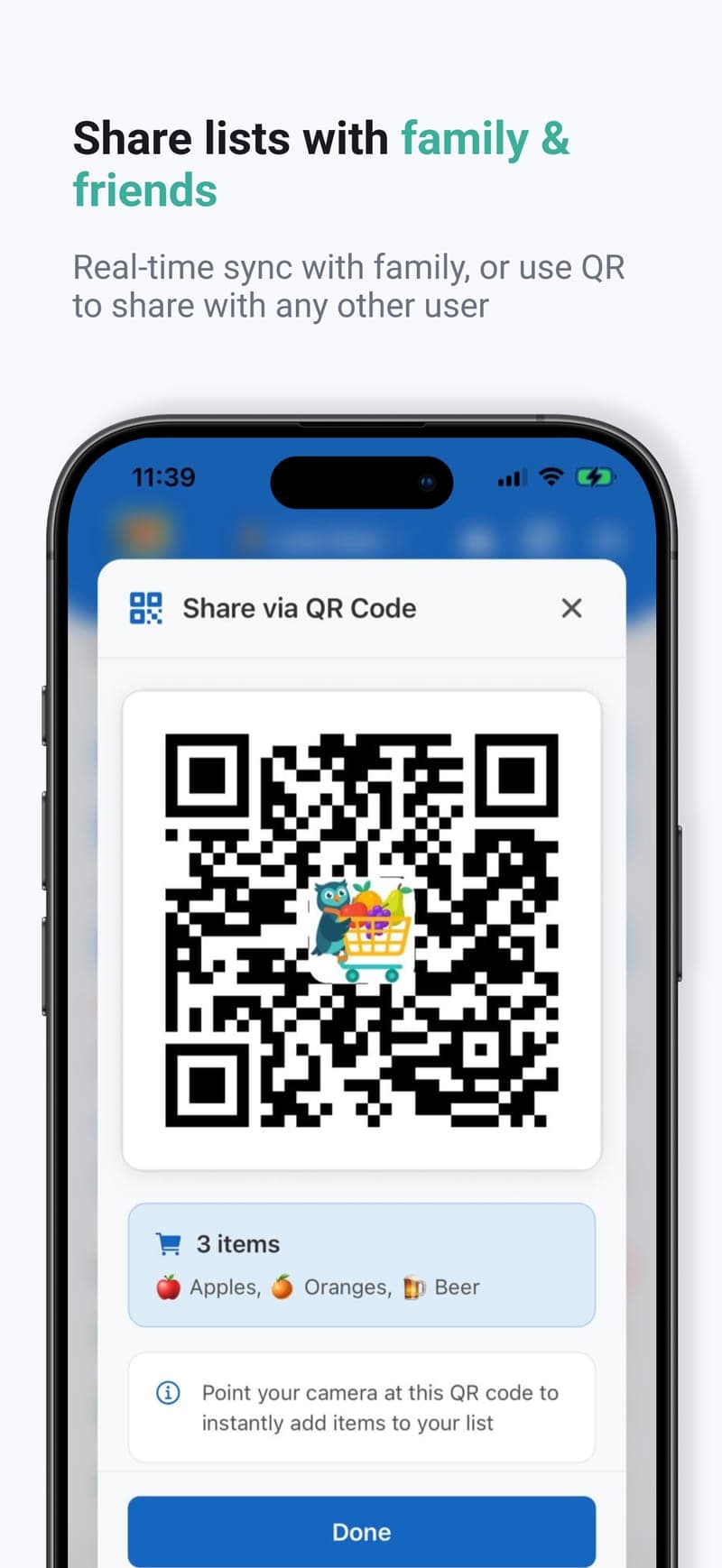
Generate a small, always-scannable QR code for any list — even big lists scan on the first try, in Messages, WhatsApp, and any app you share into.
Family Purchase History
Track purchase counts across all family members. See combined shopping patterns!
Secure Sharing
Encrypted, signed share links that expire within about 48 hours for your privacy.
📋 Organize Every List
Weekly groceries, monthly stock-ups, trips — a list for everything.
Custom Shopping Lists
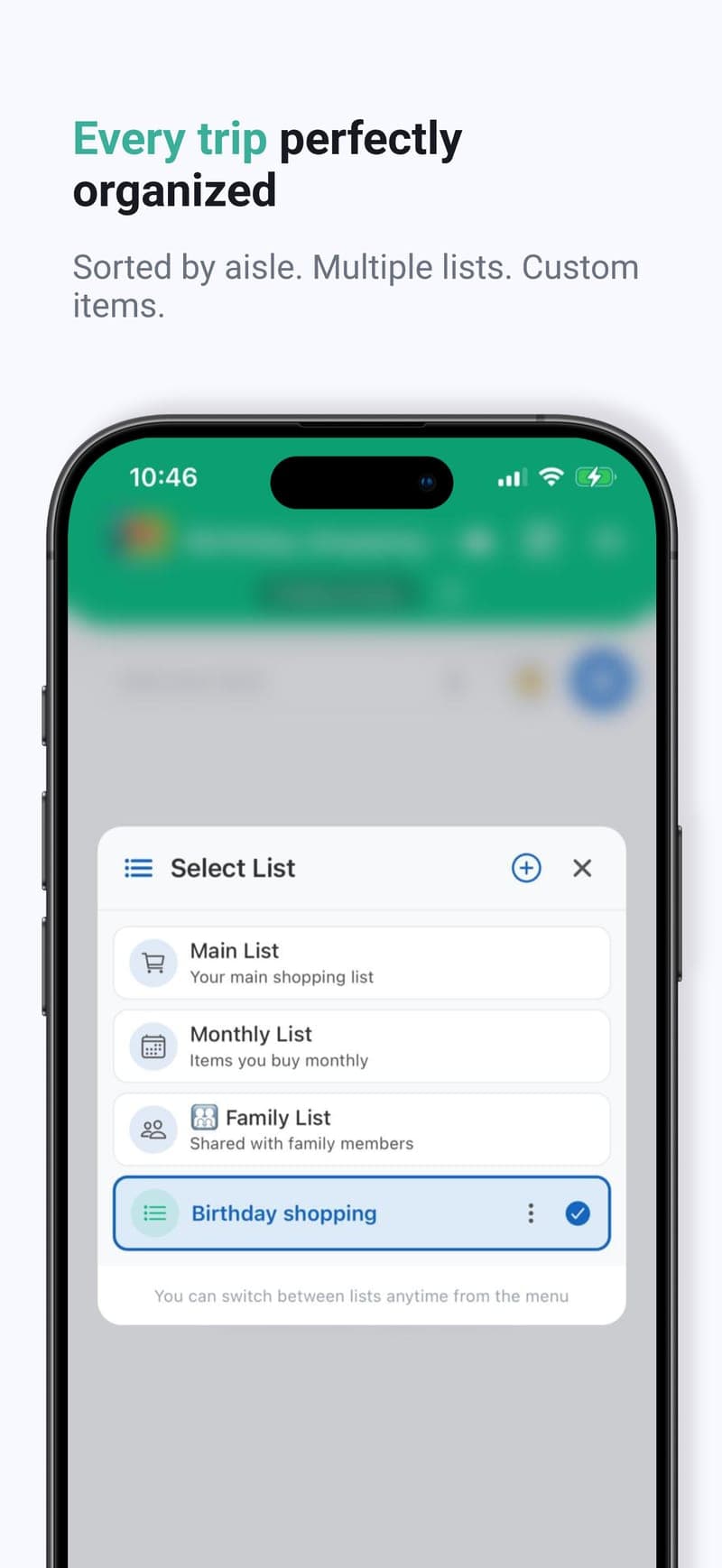
Create personalized, color-coded lists for any occasion. 3 free custom lists for everyone, unlimited with Premium.
Multiple Shopping Lists
Default List for everyday groceries, Monthly List for less frequent purchases.
Move Items Between Lists
Tap the three dots on any unbought item and select 'Move to list' to transfer it to another list. Name, quantity, and price are preserved.
Quick List Switch
Tap the header title to instantly switch between Default, Monthly, and Family lists.
Remember Last List
App opens to your last viewed list automatically. No more switching every time!
💰 Track Your Spending
Know what you’ll spend before you reach the checkout.
Price Tracking
Add prices to items, see running total, track your spending.
Cost Estimation
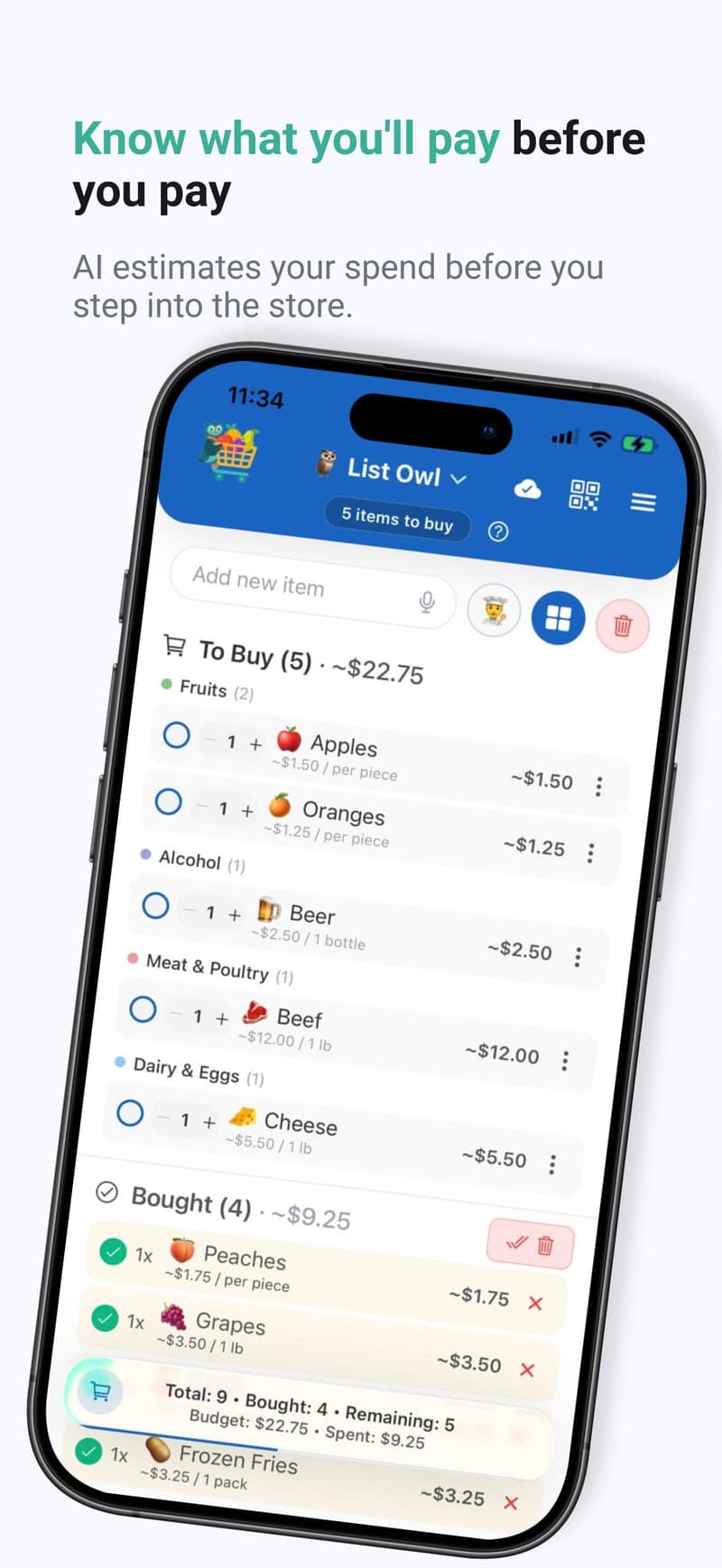
Estimate grocery costs for your entire shopping list with one tap. Prices based on your city and country, with auto-detection and manual override. Tap any price to edit.
Activity Timeline & Badges
See when you bought each product and how much you spent, and earn 38 badges for streaks, lists completed, meal plans, recipes viewed and barcode scans. Locked badges show a progress ring and how to earn them.
🎨 Make It Yours, Keep It Private
Themes, sign-in options and full control of your data.
Glass Design
A light, translucent look for messages, menus and your floating totals, with Apple's Liquid Glass on iOS 26 and a slimmer header. Prefer solid colours? Turn glass effects off in Themes.
Holiday Themes
Automatic seasonal theming for New Year, Pride Month, Halloween, Thanksgiving, and Christmas. Festive colors, header decorations, and themed logo animations.
Dark Mode
Easy on your eyes with Light, Dark, and System (Auto) theme options.
Custom Color Palettes
Pick your own accent palette from the Themes screen. Curated palettes that pair with Light, Dark, and System appearance modes.
iOS App
List Owl is on the Apple App Store! Enjoy the full experience on iPhone with native swipe gestures and a custom iOS app icon.
Google Sign-In
One-tap authentication. Secure, private, and convenient.
Apple Sign-In
Sign in with your Apple ID on iPhone — fast, private, and secure authentication.
Account Deletion
Delete your account and all associated data directly from within the app. Instant, complete, and privacy-compliant.
App Screenshots
Get List Owl free
On iPhone and Android, in English, Spanish, Russian and Chinese.


❓ Frequently Asked Questions
Open the side menu and tap Meal planner. Answer four quick questions — who you're cooking for, anything to leave out, how much time you have on a weeknight, and what you like to eat — and you get a week of dinners with one aisle-sorted shopping list and an estimated total. Swap any dish for one of three alternatives, open Cook for step-by-step instructions, then tap Add all to list. It's a Premium feature with 8 plans a month, and you can try it free for 3 days.
Yes. When someone starts ticking items off the family list, everyone else gets an "Anna is shopping" notification, so you can add what you need before they reach the till. When members add items you get one summary about a minute later, naming up to three of them. Both alerts can be switched off in Side menu → Reminder settings → Family list, and family members receive them without Premium.
Yes. Open the side menu → Themes → Effects and switch off Glass effects; every surface becomes solid straight away. On iPhone, turning on Reduce Transparency in your accessibility settings does the same automatically.
Badges are achievements you earn as you shop — streaks, items bought, lists completed, favourite products, meal plans, meals cooked, recipes viewed and barcode scans, 38 in all. Locked badges show a progress ring and how to earn them. Open the side menu → Activity Timeline → Badges.
Tap the microphone icon in the add-item field and speak. List Owl uses your device's built-in speech recognition, so it works in all 4 supported languages (English, Spanish, Russian, Chinese). On-device recognition is used when available, with a cloud fallback for less common languages. No audio is stored by us — only the transcribed text reaches the app.
Tap the barcode icon next to the add-item field, point your camera at any product barcode, and List Owl automatically looks up the product and adds it with the correct name and emoji. You get 5 free scans; Premium members get 150 scans per month. A free Google or Apple account is required to use the scanner.
Tap the chef hat icon, name your dish, set how many people you're cooking for, and get a complete ingredient list automatically. AI generates the recipe in your chosen language!
You get 3 free recipe uses for life. Premium subscribers get 60 recipe uses per month.
Two ways: tap the chef hat, switch to the "Recipe URL" tab, and paste a link to any recipe page — or share a recipe link from your browser or another app straight into List Owl and the import starts automatically. The ingredients are pulled in with the right name, quantity, emoji, and store aisle, with units translated to your language. You get 5 free imports; Premium members get 30 imports per month.
Shared lists are now stored behind a short code, so even large, multi-item lists produce a small, crisp QR code that scans on the first try. It works reliably across iPhone, Android, WhatsApp, Messages/iMessage, and any app you share a link into. Your data stays encrypted — only the recipient who scans the code can open the list.
Recipes work in all 4 supported languages: English, Spanish, Russian, and Chinese.
Mochi, our Alexa skill, is being retired. It still works if you already set it up, but it is no longer part of new releases and we do not recommend it for new users. Voice input inside the app — the microphone in the add-item field — works in all four languages and is the easiest way to add items by voice.
The app shows the number of unbought items right on your app icon. It updates in real-time as you check off items, and even syncs when family members modify the shared list!
Yes. New subscribers can try every Premium feature free for 3 days — the Meal Planner, family sharing, cloud sync, more recipes and cost tracking. You start it after onboarding or from the upgrade screen (a free Google or Apple account is required), and it converts to a paid subscription unless you cancel first — on iPhone, at least 24 hours before the trial ends. Cancel anytime in your Google Play or Apple ID account settings.
No! The app works great without signing in. A free Google or Apple account is only needed for cloud backup, family sharing, the barcode scanner, and starting the free trial.
Yes, your data is protected with multiple security layers: HTTPS Encryption (all data transmission is encrypted using industry-standard TLS), Google Authentication (we use Google's secure sign-in system), Google Cloud Infrastructure (data is stored in Google Cloud Storage with Google's standard cloud security measures), and Access Controls (your data is only accessible to you and people you explicitly share with). Note: While Google provides infrastructure-level encryption, we recommend not storing highly sensitive personal information in your shopping lists.
That's totally fine! All core features work without Premium, including smart reminders, aisles, voice input, quick list switching, and free recipe uses. You just won't have the Meal Planner, cloud backup or family sharing.
With Premium, yes! Sign in on any device and your lists sync automatically.
One person creates the family list (that person needs Premium), then shares a QR code. Up to 5 people scan it to join — they do not need Premium, and they get the family notifications too. Everyone sees changes in real time, and the list keeps working offline.
List Owl detects it instead of quietly overwriting: the later change is kept and a message names the item that changed. "Clear all" and "Clear bought" only remove the items you could see when you tapped, so anything a member added a moment earlier stays on the list.
Yes, anytime! Go to Family Sharing and tap "Leave". You'll keep your personal lists.
On Android, manage your subscription in Google Play Store settings; on iPhone, in your Apple ID subscription settings. You'll keep Premium until the end of your billing period.
Yes! Your lists work fully offline, with no account needed. The cloud icon at the top shows when you're offline. On a family list you can tick, add, delete and clear offline too — your changes queue up and sync as soon as you're back.
If you're signed in with Premium: Your data remains safely stored in the cloud. Just reinstall and sign in to restore it. If you're not signed in or using Free version: Your data is only stored locally on your device and will be lost if you uninstall.
🚀 Getting Started
- 📲Install the AppDownload from Google Play or the App Store
- 🔢Check Badge CountSee unbought items right on your app icon
- 📱Quick SwitchTap the header to change lists instantly
- 🔐Sign In with Google or AppleOptional, but required for cloud features
- 👑Try PremiumStart a 3-day free trial for the Meal Planner, family sharing and cloud backup
- 👨👩👧👦Create FamilyShare a QR code — members join free and get the alerts too
- 🛍️Shop TogetherEnjoy real-time sync with your family!
Stay in the loop
Sign up for occasional updates on new features, improvements, and product news from List Owl — straight to your inbox.
💬 Love List Owl?
Give us a hoot on Google Play or the App Store! Your review helps other shoppers discover the owl.
⭐ Review on Google Play⭐ Review on the App Store
Got ideas? Email us at: support@avio.space
The owl reads every message! 🦉 📧
Contact
Have an idea to make List Owl even better? Need Support? We'd love to hear from you!